

Image database vs DAM: what’s the difference and when to switch
Learn how these software solutions differ — and when DAM is the better choice.

An image database stores and organises media files. A digital asset management (DAM) system does that too, then adds the things an image database can’t: automated tagging and metadata, rights management, workflows, and distribution to every channel. Once your library runs to tens of thousands of assets across teams and systems, an image database hits its limits and a DAM earns its place.
In times of rapidly growing media libraries, companies need far more functionality than traditional image databases can provide. This article reveals what digital asset management (DAM) systems offer in comparison.
The problem with large volumes of media files
Whether for product or corporate communications, media content such as images and videos is indispensable—and often costly or time-consuming to produce. What’s surprising is how unsystematically these assets are still managed in many organizations: files are scattered across cloud storage systems in deeply nested folder structures, stored in CMS media libraries, or spread across personal network drives in different departments. Anyone looking for a specific file or piece of content must first navigate multiple storage locations or rely on colleagues—sometimes successfully, sometimes not.And once the desired image is finally found, the real work begins: checking versions, clarifying usage rights, generating the appropriate formats, obtaining approvals, and more.
A centralized image database can help counteract this patchwork of storage systems. However, when dealing with tens of thousands of images and media files, these image databases quickly reach their limits. Manual maintenance becomes increasingly time-consuming, and content discoverability suffers. A DAM system—essentially a highly functional evolution of the classic image database—provides a solution here.
Key takeaways
- Image databases eventually reach their limits: Depending on the industry and company size, a traditional image database may still be sufficient for managing media content. However, given the growing demand for content in corporate and product communications, such solutions quickly reach their limits. Manual effort increases, and maintaining a reliable structure becomes difficult over time.
- A DAM system is more than a media archive: A digital asset management system is far more than a repository for images and videos. Modern systems are designed to manage an organization’s entire digital asset inventory and to support all processes related to content delivery—such as through automation and additional management features (e.g., roles and permissions, workflows, workspaces).
- DAM is a process-oriented software discipline: Modern DAM systems are capable of mapping the entire life cycle of a digital asset—from ingestion and organization within the system to further processing and brand-compliant, legally secure distribution. They deliver their full value when seamlessly integrated into the system landscape and media flows and closely aligned with day-to-day workflows.
What is an image database?
The term “image database” generally refers to systems that serve as storage locations for digital media content and aim to bring structure and order to media collections. The focus is therefore on file management and organization. The range of image databases extends from lightweight archival solutions for private photo collections to more feature-rich platforms used by companies—primarily within marketing departments.
Typical use cases for an image database
- Marketing and content operations
- Internal communications and public relations
- Product management and sales support
Pros and cons of a classic image database
For companies with manageable media libraries and clearly defined use cases, a traditional image database can be perfectly adequate. The main advantage of such a solution lies in its simplicity. Image databases focus on content archiving and can be implemented with relatively little effort—organizationally, technically, and financially.
However, as the number of assets, requirements, and stakeholders grows, these systems reach their limits. Metadata models often restrict search capabilities, or the systems lack interfaces to other systems, creating additional manual effort. As organizations scale, more functions and automation are required to comprehensively support workloads and workflows.
The evolution of DAM systems
The origins of DAM systems date back to the 1990s, when digital media archives were developed for publishers, media companies, news agencies, and advertising agencies. With advancing digitalization and the growing volume of digital content, DAM systems became relevant to a broader audience and—like all software solutions—were adapted to meet evolving business needs.
Originally, DAM systems primarily supported the management and maintenance of images, videos, layout files, and campaign materials. Today, they are central marketing tools and act as a single source of truth for all digital assets within an organization.
Image database vs DAM system: side by side
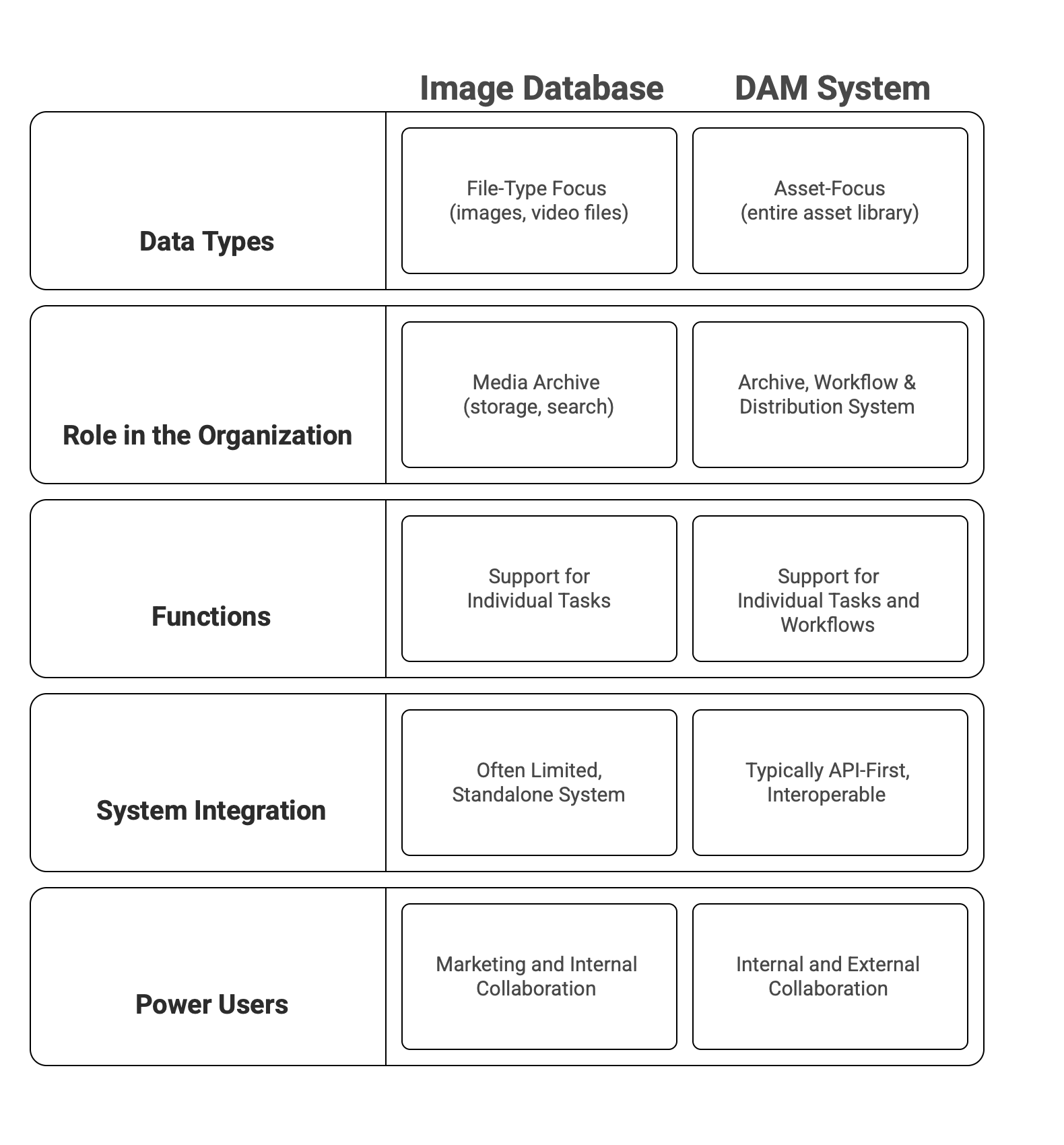
- A DAM System Manages More Than Just Images:
Image databases focus primarily on image and video files such as JPG, TIFF, and MP4. DAM systems, by contrast, enable companies to centrally manage their entire asset inventory—from classic media content to layout files (e.g., InDesign, Photoshop), 3D models, packshots, certificates, and much more. This ensures consistent management practices and creates a single source of truth for all use cases.
- A DAM System Is More Than an Archive:
Image databases primarily serve as storage solutions. DAM systems, on the other hand, are true marketing tools. They are equipped with features that support not only the management and maintenance of assets but also their distribution—both internally and across partners as well as communication and sales channels. Tasks such as tagging, cropping, and formatting can be automated.
- A DAM System Is Interoperable:
Traditional image databases are often isolated and can be used with other systems only to a limited extent. Modern DAM systems, by contrast, integrate seamlessly into existing system landscapes. They communicate with other relevant systems (such as PIM, ERP, or e-commerce platforms) via APIs and can flexibly connect applications like Adobe Creative Cloud through plugins. This centralizes creative processes, simplifies workflows, and accelerates media flows.
Why companies move to a DAM
- Rapidly growing media libraries
The volume of digital content that companies need to manage continues to grow. Without a central management platform such as a DAM system, many assets remain unused. DAM systems are also equipped with powerful—and increasingly AI-driven—search capabilities, allowing asset libraries to be searched based on content and in natural language. Learn more about AI-powered search in Sharedien here. - Focus on efficiency
Manually managing and maintaining digital assets is time-consuming. Modern DAM systems therefore automate recurring tasks: they recognize image content and text (OCR), automatically generate tags and metadata, and create and distribute derivatives for different use cases, audiences, and channels. - Growing demand for creative content
Creative processes often involve many stakeholders, both internal and external. DAM systems provide a central working environment with workspaces, integrated workflow management, and granular roles and permissions—ensuring smooth and efficient collaboration. - Legal compliance
Expired licenses, missing copyright information, or violations of usage rights can result in significant costs. Modern DAM systems therefore include digital rights management features, such as alerts before license expiration dates, to ensure that only legally compliant assets are used.
5 signs you’ve outgrown your image database
An image database is fine, until it isn’t. Here’s how you know.
- Finding one asset takes too long.
- The same files exist in five places, and some are wrong.
- Expired or off-brand assets still go out the door.
- Nobody’s tracking image rights and licences.
- Your library can’t talk to your other systems.
Recognise three or more, and you’ve outgrown storage.
Best practices for moving to a DAM
A DAM system is not an end in itself and it requires foresight during implementation. A central foundation is a metadata strategy that defines the terminology and structure used to organize files within the system. In addition, governance concepts are essential to ensure proper day-to-day system usage. These include clear guidelines for power users as well as more general training in areas such as data literacy and AI.
Equally important is technical integration into the existing system landscape. Interfaces with content management systems, PIM or ERP solutions, creative tools, or e-commerce platforms ensure that digital assets are always available exactly where they are needed. For this reason, careful consideration should be given not only to the choice of solution and vendor but also the selection of the integrator.
- Develop a metadata strategy with taxonomies and terminology based on your current and future requirements.
- Integrate the system with a focus on media flows and touchpoints across the entire asset lifecycle—from creation and usage to archiving.
- Define clear roles, responsibilities, and processes for system usage.
- Provide training and guidelines for working with the asset library.
- Involve your employees in implementation and ongoing development processes.
Conclusion
Today, far more than a simple storage solution for media files is required. With a DAM system, you can centrally and securely provide your company’s asset library and optimally support your marketing and creative teams in their daily work.
Are you considering implementing a DAM system? We would be happy to advise you: Book an appointment
Frequently asked questions
What is the difference between an image database and a DAM?
An image database stores and organises media files. A DAM (digital asset management) system does that too, then adds automated tagging and metadata, rights management, workflows, and distribution to every channel. An image database is a library; a DAM is a system that manages the whole asset lifecycle.
When should I switch from an image database to a DAM?
When your library outgrows simple storage. The tell-tale signs: search takes too long, duplicates pile up, the wrong or expired asset goes out, nobody is tracking image rights, and your systems do not talk to each other. Recognise three or more and it is time to move.
At what company size does a DAM make sense?
A DAM becomes worthwhile as soon as media libraries and content processes get complex or resource-intensive, regardless of company size. What matters is the volume, variety, and frequency of asset use, not the number of employees.
What file types can a DAM manage?
All common media formats, plus complex files like 3D models, layout files, presentations, documents, and certificates. A DAM manages your entire digital asset inventory in one place, not just images and video.
What role does AI play in a modern DAM?
AI raises the level of automation: automatic tagging with metadata, generating the right derivatives, natural-language (content-based) search, similarity search, and finding text inside images via OCR.
How does a DAM integrate with our existing systems?
Through modern APIs. Standardised interfaces make implementation far simpler than older custom integrations, and let a DAM connect cleanly to PIM, ERP, e-commerce, and creative tools.
Last updated: 22 July 2026
About the author
As Senior Marketing Manager, Tina leads content strategy at Sharedien. With over 7 years of experience in B2B SaaS marketing, she develops editorial plans, campaigns, and formats that make complex topics clear and impactful. LinkedIn

More
articles
Keep reading and take a look at our latest blog articles.

What is Document Management? Definition, Functions & Benefits



Master data poverty is a disease - and most companies don’t know they have it


Discover the Total Economic Impact of Sharedien (TEI)